We are currently using a LoRaWAN gateway connected to our local network. In this setup, we can access the gateway’s Web UI from a PC on the same LAN and successfully see the LoRaWAN packets arriving from our end devices.
Now, we would like to extend this setup so that the gateway communicates with a ChirpStack server running on a remote PC (outside the local network), using an Internet/WiFi connection instead of being restricted to the local LAN.
Specifically, we are trying to understand:
How to configure the LoRaWAN gateway so that it can forward the uplink data via the Internet to a ChirpStack server hosted on a remote PC.
What changes (if any) are needed in the ChirpStack configuration (e.g., packet forwarder endpoint, MQTT broker, ports, firewall/NAT considerations).
Best practices for securely exposing the ChirpStack server to the Internet (e.g., VPN, TLS, or reverse proxy).
Whether it is possible to continue viewing packets in the gateway’s Web UI while simultaneously sending them to a remote ChirpStack server.
In summary, our current local setup works fine, but we need guidance on enabling remote communication over the Internet/WiFi so that LoRaWAN data packets can be viewed and processed on a ChirpStack server hosted on a PC that is not on the same LAN.
Any step-by-step explanation or recommended architecture would be greatly appreciated.
As long as your LAN has internet connectivity the gateway should be able to just reach your server on WAN. Typically outbound ports are open as well so firewall shouldn’t be an issue.
No Chirpstack changes, firewall shouldn’t be an issue but would be the first thing to investigate if the setup fails, no NAT is required - the gateway reaches out to the server not vice-versa.
This is the real question here.
You should have all interfaces that are exposed to the internet secured with encryption and authentication. The only two interfaces you should need exposed are the webUI/grpc and MQTT/the gateway bridge (depending on whether you are using MQTT forwarder or UDP forwarder on your gateway).
The webUI already has authentication but not encryption, so you need to add a reverse-proxy in front that terminates TLS and passes unencrypted traffic to Chirpstack.
The MQTT/gateway bridge has neither authentication nor encryption by default. I’ll assume you are using the MQTT forwarder, as UDP is harder to secure. So for this you can either use Chirpstacks built in TLS features to secure the MQTT broker: Mosquitto TLS configuration - ChirpStack open-source LoRaWAN® Network Server documentation. Or you can also just go the reverse-proxy route to terminate TLS with a password file on your mosquitto to require user login. I’d recommend just using either NGINX + certbot or Traefik to handle all the TLS for the UI/MQTT, makes it easier because they can generate certificate and renew them automatically. Here’s a good thread about it: How to Secure MQTT Messages on ChirpStack to Prevent Unauthorized Access? - #14 by bastienvty
Not sure on this one. It gets a little tricky because only one server can respond to the uplinks/joins, which mean the other server would need to share all of the keys so it can decrypt the traffic. There probably would be a way but I am not sure if it is included in base Chirpstack.
here i am using semtech UDP packet forwarder, in that case should i install chirpstack mqtt forwader in raspberry pi?
If we are using chirpstack mqtt forwarder, is there any relevance for chirpstack gateway bridge.
I am able to view the decrypted LoRaWAN packets on my PC through the ChirpStack Web UI. Is there a method to directly access or utilize these decrypted packets from the Web UI?”
Like Things network, can we access chirpstack web UI remotely using internet?
No, the Chirpstack MQTT forwarder vs Chirpstack gateway bridge serve the same purpose - to connect a gateway to Chirpstack over MQTT. The MQTT forwarder was made to be a more lightweight version of the gateway bridge for gateways that didn’t have much space, but it works by replacing the standardized UDP or basic station packet forwarders and communicating directly with compatible gateway concentrators, whereas the gateway bridge works on top of those standardized packet forwarders.
So in short it’s one or the other.
I assumed you were using the Chirpstack Gateway OS as a gateway, where MQTT forwarder comes pre-installed. If that’s not the case and you can use the MQTT forwarder, for sure give it a shot. If not you can either use the gateway bridge on the Pi, basic station with WSS, or get your hands more dirty to secure the UDP using a tunnel or something. I’d highly recommend using the gateway bridge or MQTT forwarder on the gateway though, much easier to secure the MQTT/TCP over the air.
Not sure what this means, how do you want to use them? If you want to have them be used by a seperate application you will want to look into the integrations, or just have your other application subscribe to the “application/#” topic of your MQTT broker where the decrypted integration messages are posted.
Chirpstack does not have a public network like TTN. But like anything if you make your personal server internet accessible you can reach it from the internet.
i am using UDP packet forwarder as well as chirpstack gateway bridge so as to translate Lora packets in to MQTT protocol
As for now, i am using raspberry pi as my lorawan gateway using Wm1302 and i am running chirpstack network server in raspberry pi OS . So my personal server is raspberry pi.So should i make it accessible to internet for accessing chirpstack web ui from remote PC?
I don’t know, this seems like a question you should be answering. Just make sure before you do you secure the ports you will expose publicly, and assuming you just have some typical home network and nothing fancy, the easiest way to expose those would be a port forward from your routers public IP to the webUI port and optionally another for MQTT if you want to connect other gateways through WAN.
@Liam_Philipp
I would like to try this.Please correct me if i am wrong
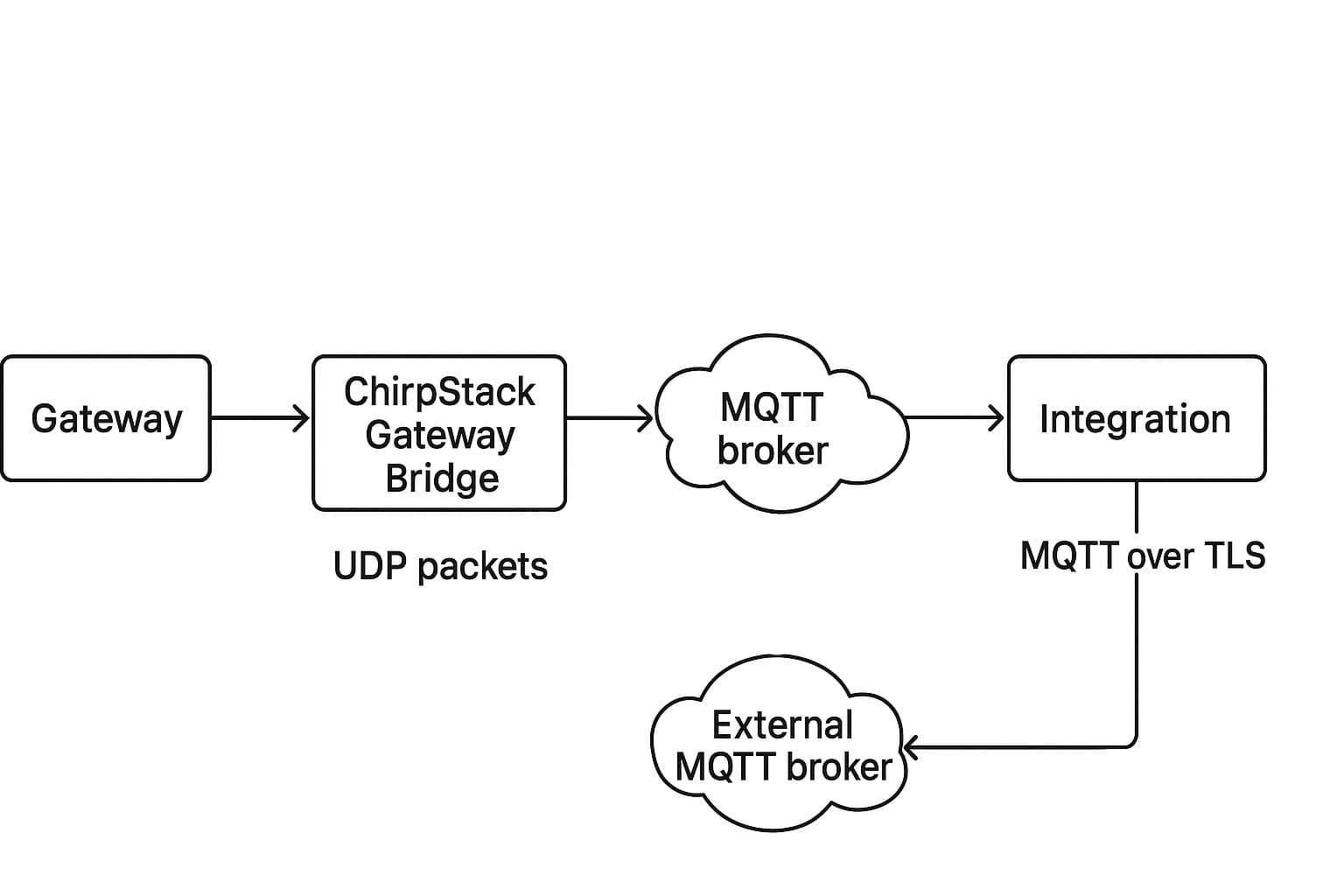
Raspberrypi Gateway(running UDP packet forwarder,chirpstack gateway bridge,mosquitto mqtt broker and chirpstack)
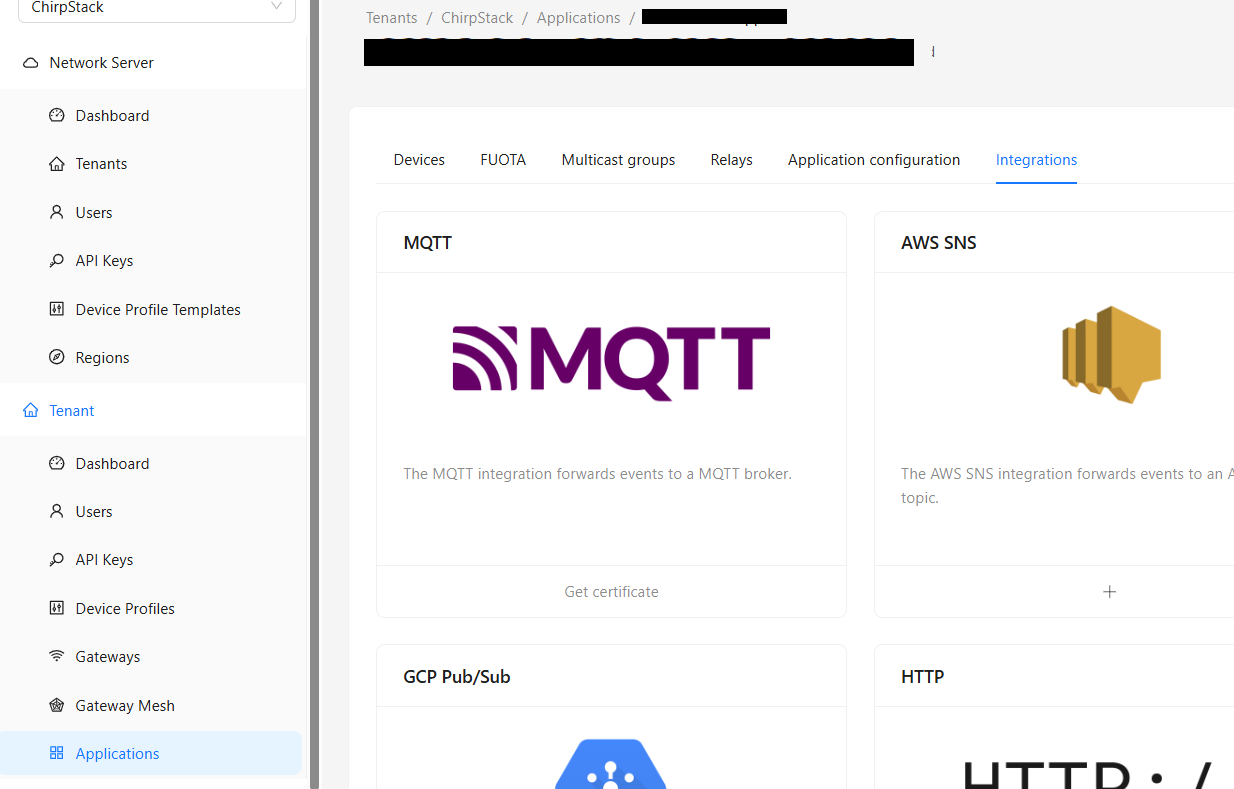
by getting mqtt broker certificate from integration slection inside application tab as given in the figure
1)after this integration can i access the packets using an external mqtt broker installed in another (apart from mqtt broker running inside raspberrypi) by subscribing to topic application/APPLICATION_ID/device/DEV_EUI/#
2)does the below setup works?which all configuration files must i edit?
This post has nothing to do with the MQTT integration. Sandeep was trying to secure his Chirpstack server so he can expose it to the internet and reach it over WAN. You are just trying to forward MQTT events to another broker.
Respectfully, I suggest you research more into the documentation and previous forum posts. All the information you need is already there, and these questions show a gap in your understanding of these systems.
But for your use case I don’t even think you need TLS if your Pi and PC are both on a local network.
You can always subscribe to your MQTT broker and retrieve the packets, the only reason to do the “integration button” (which is not an integration just a TLS option) above is it gives you one way to secure access to your MQTT broker, which by default has no restriction on who can subscribe to what
Also an MQTT broker does not subscribe, that is what a client does. So either you use the integration in your chirpstack.toml to send the messages to another broker, or you make whatever application you would have on your external PC subscribe to Chirpstacks MQTT broker.
Sure, but technically it should be “Chirpstack” not “Integration” in the box sending to the external MQTT broker.
The guide literally shows you how to generate the certificates. Personally though I use openssl for certificate generation. But in my own Chirpstack deployment I am not using these self signed certificates at all. Instead I use a reverse proxy Traefik as I suggested to sandeep.
Following up on my previous message — I wanted to share an update and seek further guidance.
I have successfully configured my LoRaWAN gateway to communicate with a remote PC via the HiveMQ MQTT broker. The gateway is now forwarding uplink data to HiveMQ, and I can receive those packets on my remote PC using a Python MQTT subscriber script.
Now, I would like to move a step further:
I want the gateway to send the LoRaWAN packets directly to a public IP address hosted on my PC (instead of using HiveMQ).
Could you please guide me on:
How to configure the LoRaWAN gateway or ChirpStack stack to forward data directly to a public IP endpoint?
What port forwarding or firewall configurations would be needed to make this work?
Any recommended best practices for securely exposing this setup (e.g., using TLS or a VPN)?
Thank you again for your continued support and valuable insights.