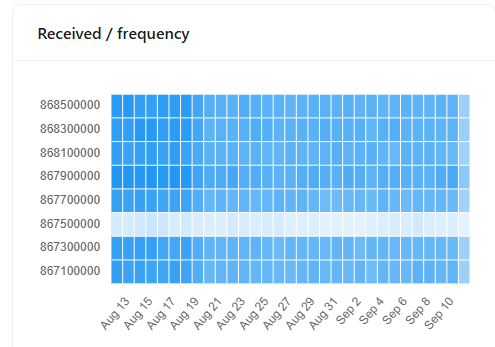
My Chirpstack system consists of several thousand devices, all located in the EU region. At only one location, I have devices that transmit very poorly on one frequency (867.5). The reason for this is that it is a train station with many shops and technical systems. The frequency appears to be congested.
It’s good to see that the gateway at this location only receives a few packets on this frequency:
Go to your regional .toml file (eu868.toml) and delete the [[regions.gateway.channels]] block with frequency=867500000.
You might also need to delete it from the [[regions.network.extra_channels]] block. Not sure what those are used for but probably best to remove it there too.
If I understand correctly, this would disable the frequency for all devices on my Chirpstack server. However, I only want to do this for certain devices.
Is there a way to disable the frequency for certain devices only?
Ah ya you understand correctly - slightly more tricky then.
The two options that come to mind:
Are your gateway bridges on the gateway or in the server? If they’re on the gateway it would be simple enough to set the gateway bridges for the gateways in that area to your new region file such that it only affects the devices uplinking through it. (Maybe this would cause problems if you need to have overlapping gateways within range that do have that problematic frequency enabled). If your gateway bridge is on the server you could just point those gateways to a new gateway bridge with the new region if feasible in your architecture.
Maybe look into how the “region configuration” setting of a device profile works. Not sure myself whether it simply blocks any transmissions from the device outside that region or if it actually determines what frequencies the server tells the device to use on join. If it’s the latter you create a new eu868 file without the 8675 frequency and a new device profile for the devices at this location that have the region configuration set to the new region.
Can’t really think of anything else to get around this but there certainly might be an easier way.
I have only ever done this in the US915 region files, but I imagine the process would be similar for the EU868.toml.
First make a copy of the region_eu868.toml and name it something else (region_eu868_no8675.toml), then in that file change the id, description, and common_name at the top of the file.
In the US915 region toml under [regions.network] section you will see an enable_uplink_channels. I imagine you can add this to the EU868.toml file you copied and set the values to [0, 1, 2, 3, 4, 6, 7] and it would excluded channel 867500000 (since that is the 5th channel).
Then you need to add this new region to the chirpstack.toml under [network] enabled_regions. The value you add is the ID value you set in the regions toml file. Restart chirpstack and make sure the new region shows up then on your gateway change the topic_prefix in the gateway-bridge.toml to this new region you created and reboot the gateway bridge.
It may take a while for ADR to push the settings your your end devices but the changes should take effect.
Thank you for your feedback – that seems to be the path I need to take. Even though I don’t particularly like the fact that a different MQTT topic has to be used.
This is because the corresponding gateways have to be rolled out with a different configuration (topic).
I don’t quite understand why this is the case – perhaps someone can explain it to me.
If I disable this frequency in the region.toml file and select this region Toml in the device profile, then when joining the device, a LinqADRReq is sent in which the disabled frequency is not set to true.A device will therefore no longer use this frequency.