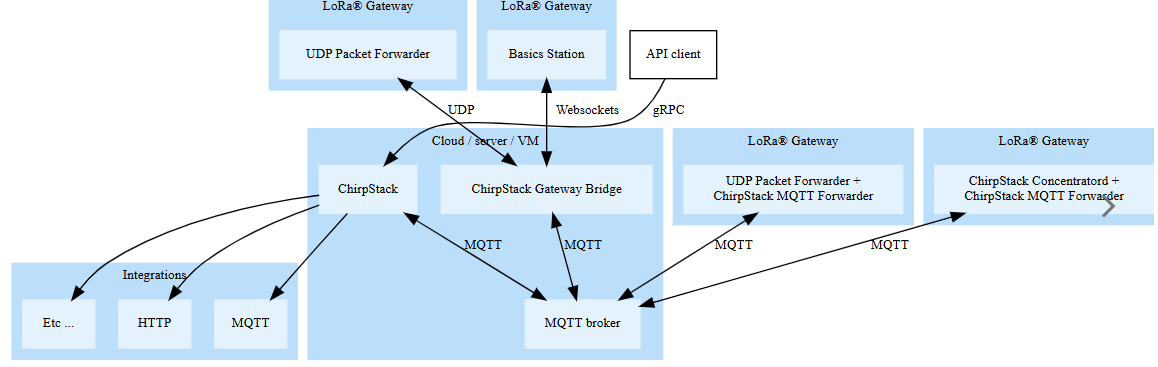
I have configured a Raspberry Pi 4B using WM1302 LoRaWAN gateway module as my LoRaWAN gateway and I’m running ChirpStack on it. Currently, I’m able to see the LoRa frames transmitted and received by the gateway in ChirpStack.
In parallel, I would like to forward the MQTT packets (published by ChirpStack to the MQTT broker running inside the gateway) to my own custom server application.
My questions are:
How will the data appear in my server application once I subscribe or forward these MQTT packets?
Will the data received in the server be encrypted, or is ChirpStack already decrypting it before publishing to MQTT?
Do I need to process/decrypt the packets further in my server application if encryption is still present?
If you are looking in the Applications → Integrations screen in Chirpstack and using the MQTT integration that give the option ‘Get certificate’ then yes you would be receiving all the data in its encrypted/encoded format.
Personally I use the HTTP integration because it sends a JSON to whatever endpoint I set it too. And using the HTTP integration if you have the device profile codec build you will receive the decoded data as part of the JSON under the “object” tag.
The “Get certificate” option in the integrations page isn’t actually the integration itself. Just a way to get a certificate for it if you set up TLS on your MQTT broker. The MQTT integration is on by default and the data is unencrypted. And if you configure TLS then connect with the certificate the data will still be unencrypted as long as you are subscribing to the “application/…” topics. MQTT integration with application server - #3 by dv8
based on the architecture diagram,the flow of LoRaWAN communication i have adopted is as given below
udp_packet forwarder <_> chirpstack gateway bridge < > MQTT broker < > chirpstack<>chirpstack Web dashboard .
Now if i want to send data to my custom server what must be the steps.
are you asking me to follow the data flow as below
udp_packet forwarder <_> chirpstack gateway bridge < > MQTT broker < > chirpstack<>chirpstack Web dashboard <> integration
For MQTT, when going in the integration menu of Chirpstack, the output is only a certificate that can be used when TLS is setup.
This allows easy generation of certificates without the needs of logging into the machine that has Mosquitto (which is the MQTT broker that Chirpstack uses).
So for instance when subsribing to application/APPLICATION_ID/device/DEV_EUI/event/up, the packets will all be decoded as if you are watching them from the web interface.
Chirpstack does the decoding for you, by basically taking the uplinks from the gateway MQTTs (that is for instance topic band/gateway/gateway_ID/event/up) and then outputting to application/APPLICATION_ID/device/DEV_EUI/event/up.
All those topics are held by the same Mosquitto instance, so you have to tweak your Mosquitto settings if you want something specific security-wise
Yes, this is the way to forward your decrypted chirpstack data to another application. If you want to use the MQTT integration you just need to configure the server= line in the [integration.mqtt] section. Alternatively you could just have your separate application subscribe to your MQTT broker and pull the data from there.
But let me just confirm a few things about your setup / goal:
Your goal is to not change how Chirpstack is currently functioning, just to pass the unencrypted sensor data to a different application.
You are currently using your Pi as a gateway and the main Chirpstack server.
Do you have Chirpstack Gateway OS full installed on your Pi? Or did you do a Ubuntu/docker?
Unfortunately, the gateway OS full is flawed for the MQTT integration - MQTT integration with application server - #19 by Liam_Philipp. I put out a pull request to fix this a while ago but no response. If you are using this I’d recommend just doing a different integration like HTTP that you can configure through the UI. Or making your Pi just a gateway and using Chirpstack on a different server.
if this method can be adopted ,the separate application must subscribe to which topics? or can we know how the chirpstack network server subscribe to which topics?
Thankyou @Liam_Philipp
Let me try out MQTT integration.
No we didnt installed concentratord.
We run Semtech UDP packetforwarder in raspberrypi and installed chirpstack gateway bridge,Mqtt Broker mosquitto and chirpstack in Raspberrypi and rasberrypi is connected to the pc via Etherenet.chirpstack dashboard is accessed from PC.
you guided us in trying out smooth communication by MQTT broker in PC instead in raspberrypi before.(Running MQTT in local PC and Gateway status is Offline)
Okay, but without concentratord or some other radio concentrator software your Pi isn’t actually a gateway and cannot recieve LoRaWAN packets, the UDP forwarder alone is not enough. Have you tested this? Are you receiving uplinks?
Ya that’s the Pi hat but what software reads it? Is the UDP packet forwarder capable of that? I thought you needed an additional software for the concentrator?