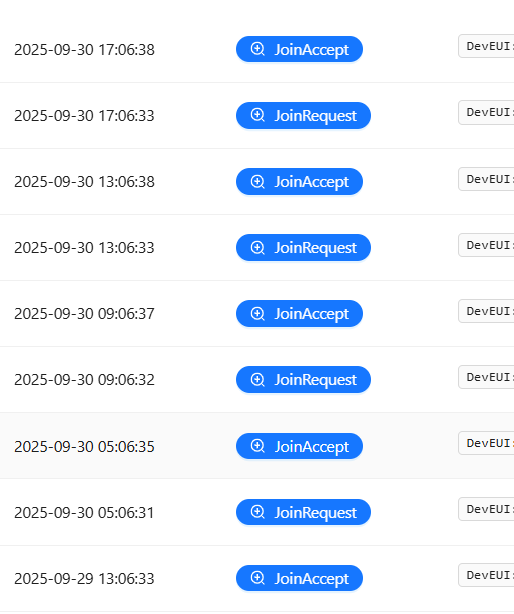
We are facing some issues with devices repeatedly sending Join Requests and Chirpstack failing to respond with Join Accept. There are devices that have send 10+ Join Requests and still fail to connect and also there are devices that have sent 10+ Join Requests and randomly receive Join Accept as they should have at the beginning. Keys are OK.
After investigating logs this is what we found:
2025-09-24T08:03:18.853074Z  INFO up{deduplication_id=54ae45f9-86b2-4f05-aac4-8aa005d0fb05}: chirpstack::uplink: Uplink received m_type=JoinRequest
2025-09-24T08:03:18.856953Z  INFO up{deduplication_id=54ae45f9-86b2-4f05-aac4-8aa005d0fb05}:join_request{dev_eui="8c83"}: chirpstack::storage::device_keys: Device-nonce validated, join-nonce incremented and stored dev_eui=8c83 dev_nonce=177
2025-09-24T08:03:18.857404Z  INFO up{deduplication_id=54ae45f9-86b2-4f05-aac4-8aa005d0fb05}:join_request{dev_eui="8c83"}: chirpstack::storage::device_queue: Device queue flushed dev_eui=8c83 count=0
2025-09-24T08:03:18.858655Z  INFO up{deduplication_id=54ae45f9-86b2-4f05-aac4-8aa005d0fb05}:join_request{dev_eui="8c83"}: chirpstack::storage::device: Device partially updated dev_eui=8c83
2025-09-24T08:03:18.858859Z  INFO up{deduplication_id=54ae45f9-86b2-4f05-aac4-8aa005d0fb05}:join_request{dev_eui="8c83"}:join_accept{downlink_id=3913764129}: chirpstack::storage::downlink_frame: Downlink-frame saved downlink_id=3913764129
2025-09-24T08:03:18.858900Z  INFO up{deduplication_id=54ae45f9-86b2-4f05-aac4-8aa005d0fb05}:join_request{dev_eui="8c83"}:join_accept{downlink_id=3913764129}: chirpstack::gateway::backend::mqtt: Sending downlink frame region_id=eu868 gateway_id=7076 topic=eu868/gateway/7076/command/down json=false
2025-09-24T08:03:18.866649Z  INFO chirpstack::integration::http: Posting event event=join url=http://10.15.1.5:5002/api/v1/chirpstackpackets/up
2025-09-24T08:03:18.866901Z  INFO chirpstack::integration::mqtt: Publishing event topic=application/675f70bd-f90b-40c3-830a-ba5a25d6b862/device/8c83/event/join
Looks like Join Accept was generated and sent to the Gateway Bridge
Logs on Gateway Bridge:
time="2025-09-24T08:03:18.650860425Z" level=info msg="integration/mqtt: publishing event" event=up qos=0 topic=eu868/gateway/7076/event/up uplink_id=38606
time="2025-09-24T08:03:18.860210112Z" level=info msg="integration/mqtt: downlink frame received" downlink_id=3913764129 gateway_id=7076
Join Accept was received by Gateway Bridge, but as far as I understand there’s a message like this missing, that would indicate that message was sent to gateway:
level=info msg="integration/mqtt: publishing event" event=ack qos=0 topic=eu868/gateway/7076/event/ack
But does that really indicate, that it was sent to the gateway? Maybe it indicates, that it was confirmed by the gateway?
Logs on the gateway:
2025-09-24T08:03:18.602636+00:00 klk-wiis-xxx lorafwd[1079]: <6> Received uplink message:
2025-09-24T08:03:18.602751+00:00 klk-wiis-xxx lorafwd[1079]: <6> | lora uplink (5E4038A4), payload 23 B, channel 868.5 MHz, crc ok, bw 125 kHz, sf 12, cr 4/5
2025-09-24T08:03:18.602826+00:00 klk-wiis-xxx lorafwd[1079]: <6> | Join Request, JoinEUI 8C83xxx, DevEUI 8C83xxx, DevNonce 177
2025-09-24T08:03:18.602877+00:00 klk-wiis-xxx lorafwd[1079]: <6> |  - radio (00000107)
2025-09-24T08:03:18.602985+00:00 klk-wiis-xxx lorafwd[1079]: <6> |   - demodulator counter 3363353213, TAI time 2025-09-24T08:03:55.567085Z, rssi -94.7 dB, snr 5.25< 7.25 <12.25 dB
2025-09-24T08:03:18.603314+00:00 klk-wiis-xxx lorafwd[1079]: <6> Uplink message (CE96) sent
2025-09-24T08:03:18.609337+00:00 klk-wiis-xxx lorad[1034]: <6> Sent 1 uplink message
2025-09-24T08:03:18.661726+00:00 klk-wiis-xxx lorafwd[1079]: <6> Uplink message (CE96) acknowledged in 58.3764 ms
2025-09-24T08:03:55.267300+00:00 klk-wiis-xxx lorafwd[1079]: <6> Heartbeat (0180) sent
As seen by the logs there’s also Join Accept missing. It should be like this:
2025-09-24T12:02:37.460152+00:00 klk-wiis-xxx lorafwd[1080]: <6> Received uplink message:
2025-09-24T12:02:37.460263+00:00 klk-wiis-xxx lorafwd[1080]: <6> | lora uplink (7110004D), payload 23 B, channel 868.5 MHz, crc ok, bw 125 kHz, sf 12, cr 4/5
2025-09-24T12:02:37.460338+00:00 klk-wiis-xxx lorafwd[1080]: <6> | Join Request, JoinEUI 8C83xxx, DevEUI 8C83xxx, DevNonce 50
2025-09-24T12:02:37.460388+00:00 klk-wiis-xxx lorafwd[1080]: <6> |  - radio (00000107)
2025-09-24T12:02:37.460494+00:00 klk-wiis-xxx lorafwd[1080]: <6> |   - demodulator counter 1234431149, TAI time 2025-09-24T12:03:14.421844Z, rssi -102.7 dB, snr 4< 6.75 <9.25 dB
2025-09-24T12:02:37.460871+00:00 klk-wiis-xxx lorafwd[1080]: <6> Uplink message (6F52) sent
2025-09-24T12:02:37.463413+00:00 klk-wiis-xxx lorad[1033]: <6> Sent 1 uplink message
2025-09-24T12:02:37.508254+00:00 klk-wiis-xxx lorafwd[1080]: <6> Uplink message (6F52) acknowledged in 47.3544 ms
2025-09-24T12:02:37.716580+00:00 klk-wiis-xxx lorafwd[1080]: <6> Downlink message (B383) received
2025-09-24T12:02:37.716990+00:00 klk-wiis-xxx lorafwd[1080]: <6> Received downlink message:
2025-09-24T12:02:37.717326+00:00 klk-wiis-xxx lorafwd[1080]: <6> | lora downlink (0000B383), payload 33 B, required 1, preamble 8 B, header enabled, crc enabled, polarity inverted
2025-09-24T12:02:37.717616+00:00 klk-wiis-xxx lorafwd[1080]: <6> | Join Accept
2025-09-24T12:02:37.717945+00:00 klk-wiis-xxx lorafwd[1080]: <6> |  - radio (00000000), channel 868.5 MHz, bw 125 kHz, sf 12, cr 4/5, power 16 dB
2025-09-24T12:02:37.718285+00:00 klk-wiis-xxx lorafwd[1080]: <6> |   - transmission (00000000), priority 1, on counter 1239431149
2025-09-24T12:02:37.719525+00:00 klk-wiis-xxx lorad[1033]: <6> Received downlink message
2025-09-24T12:02:42.398606+00:00 klk-wiis-xxx lorad[1033]: <6> Sent downlink message at 15 dB
2025-09-24T12:02:42.403152+00:00 klk-wiis-xxx lorafwd[1080]: <6> Received uplink message: transmission event (0000B383 / 00000000), status "Transmitted", power 15 dB
2025-09-24T12:02:42.403619+00:00 klk-wiis-xxx lorafwd[1080]: <6> Downlink message (B383) acknowledged
2025-09-24T12:02:48.862475+00:00 klk-wiis-xxx lorad[1033]: <6> Sent 1 uplink message
We are puzzled where Join Accept packets are being lost. There is no logs that would pin point origin of the issue (we might be looking at the wrong places).
I think it is important to note, that we are using Dockerized version of Chirpstack. Gateway Bridge is being run on the server, not separately on the gateways. Gateway - Wirnet iStation.
Any tips in solving this would be greatly appreciated